



What happens when a rule matches
Matching is one half. This is the other: what actually gets removed, what gets marked, and how to see it before any of it happens.
Delete scope — how much goes
Pick one depth per action, and it nests. Episode is that episode's file, Season is the season and its episodes, Show is the whole series. Click the selected pill again to turn the action off.
This is not the same control as the match level. Matching per season with a delete scope of Show removes an entire series because one season qualified, which is correct for some libraries and a disaster in others, and is the single easiest thing to set by accident.
The same depth pills appear under **Unmonitor in arr*, separately. Unmonitor works on its own, and is the gentlest thing a rule can do, since it only stops Sonarr looking for more. Deleting does not work on its own: a rule that deletes files must also unmonitor at the same depth or deeper, or Sonarr downloads them again and the rule deletes them again. A rule set up that way is refused when you save it. Delete … entirely is the exception, because nothing is left in the *arr to monitor.
The actions, in the order they escalate
These are the rule's standing settings: what it does on its normal schedule, once a title has waited out Act after (days) and its time in Leaving Soon. A new rule starts with unmonitor and delete on (at show and movie depth) **and Delete file from disk on**, so check these before you save. Prevent re-adding and Also cancel the Seerr request start off. The later ones are only offered once the earlier one is, because they would otherwise be meaningless. Turn on Dry run only to see what a rule would do before it does it.
| Action | What it does |
|---|---|
| **Unmonitor in arr* | Stops Sonarr or Radarr looking for the title. Nothing is deleted. |
| Delete file from disk | Removes the file, not just the arr entry. Disabled while Dry run only* is on. |
| Delete … entirely from Sonarr/Radarr | Removes the arr record itself. Files go too if Delete file from disk* is on. |
| Prevent re-adding | Adds the title to the arr's Import List Exclusions, so an import list or Seerr cannot silently put it back. Offered only once Delete … entirely* is on, and only at show or movie depth. |
| Also cancel the Seerr request | Clears the request that brought the title in. Offered only once the rule actually deletes the file — removing somebody's request while the file is still on disk would report the title as gone when it is not. Never offered at episode depth, because Seerr tracks requests per season. |
Prevent re-adding is the one people want and do not find. Without it, a rule that deletes a title an import list still contains simply deletes it again next week, forever.
Run & delete now is a one-time action, separate from the settings above. It is the "clean it up now" button, and it is not the same as Run now. It re-runs the rule and then acts on everything of that rule's that is still eligible, immediately, skipping the countdown and the Leaving Soon rescue window. The delay is the only thing it skips. It does exactly what the rule's standing settings say, just now: with Delete file from disk off, it removes the *arr entry and the files stay on disk. Everything else on this screen gives you the grace period; this one is the deliberate way past it.
Three things about it are worth knowing before you press it:
- It is not limited to this run's matches. It brings the rule's whole queue due, including rows part-way through their countdown.
- It re-runs the rule first and deletes only what still qualifies, so a verdict stored days ago is never executed unread. If that re-run fails, nothing of that rule's is deleted.
- It honours your delete caps. It used to ignore them, which meant "run this one rule" could quietly exceed what "run everything" would have refused. Anything over the cap is deferred rather than deleted.
Duplicate copies a rule into a new one that is turned off, so you can edit it before it ever runs.
Leaving Soon, and the countdown
A rule does not have to act immediately. Act after (days) is the grace period, and while it runs the title sits in a Leaving Soon collection.
| Setting | What it does |
|---|---|
| Collection name | What the holding collection is called. Defaults to Leaving Soon. |
| Countdown overlay | Draws LEAVING IN N DAYS on those posters in the default style. No Overlays setup needed — this is the one overlay you get without configuring anything. |
| Act after (days) | How long a matched title waits before the actions above run. |
The grace period is what makes a mistaken rule survivable: somebody sees the countdown on a poster and tells you before the file goes.
Two more protections, on the rule itself
| Setting | What it does |
|---|---|
| Keep anything a protected person is partway through | On by default. A protected person with a half-watched title holds it, even when the rule otherwise matches. |
| Clean up finished seasons, keep ones they haven't finished | TV rules only, on by default. Acts season by season rather than on the whole show, so a series somebody is midway through loses the seasons they have finished and keeps the one they are in. |
The second does not appear on a Radarr rule. A film has no seasons, and showing the toggle there only left you working out whether it applied to you.
Tag on delete — what gets marked in the *arr
When a rule deletes an item's files but keeps the entry in Sonarr or Radarr, these tags go onto the kept entry: the "removed from disk but still tracked" mark. They are applied only on a real file delete, and skipped entirely when Delete … entirely from Radarr/Sonarr is on, because there is nothing left to tag.
Live Preview — what it would do, before it does it
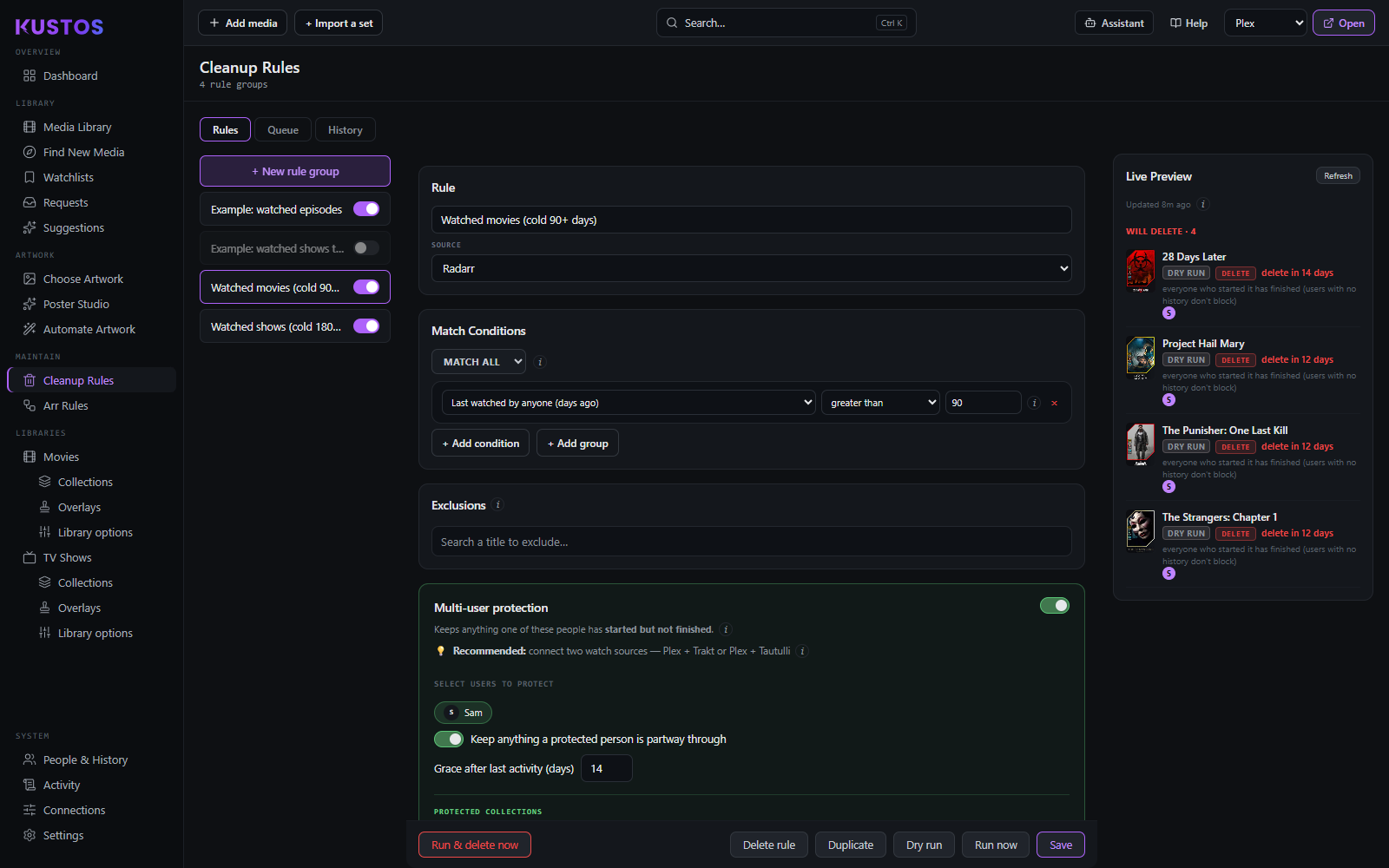
Every row states its verdict and the reason for it, so "why is this being deleted" and "why is this one not" are both answered on the same screen.
Both lists are about deletion. A protected title is not queued and not listed — the preview shows what the run would delete, and protection is reported as a single count above it. If a rule looks like it is doing nothing, that count is where to look: it is matching titles and protection is holding every one.
The preview is cached, so its timestamp can be a few minutes old. It recomputes on its own when your library or watch data changes, and Refresh forces a fresh scan now.