



Library options
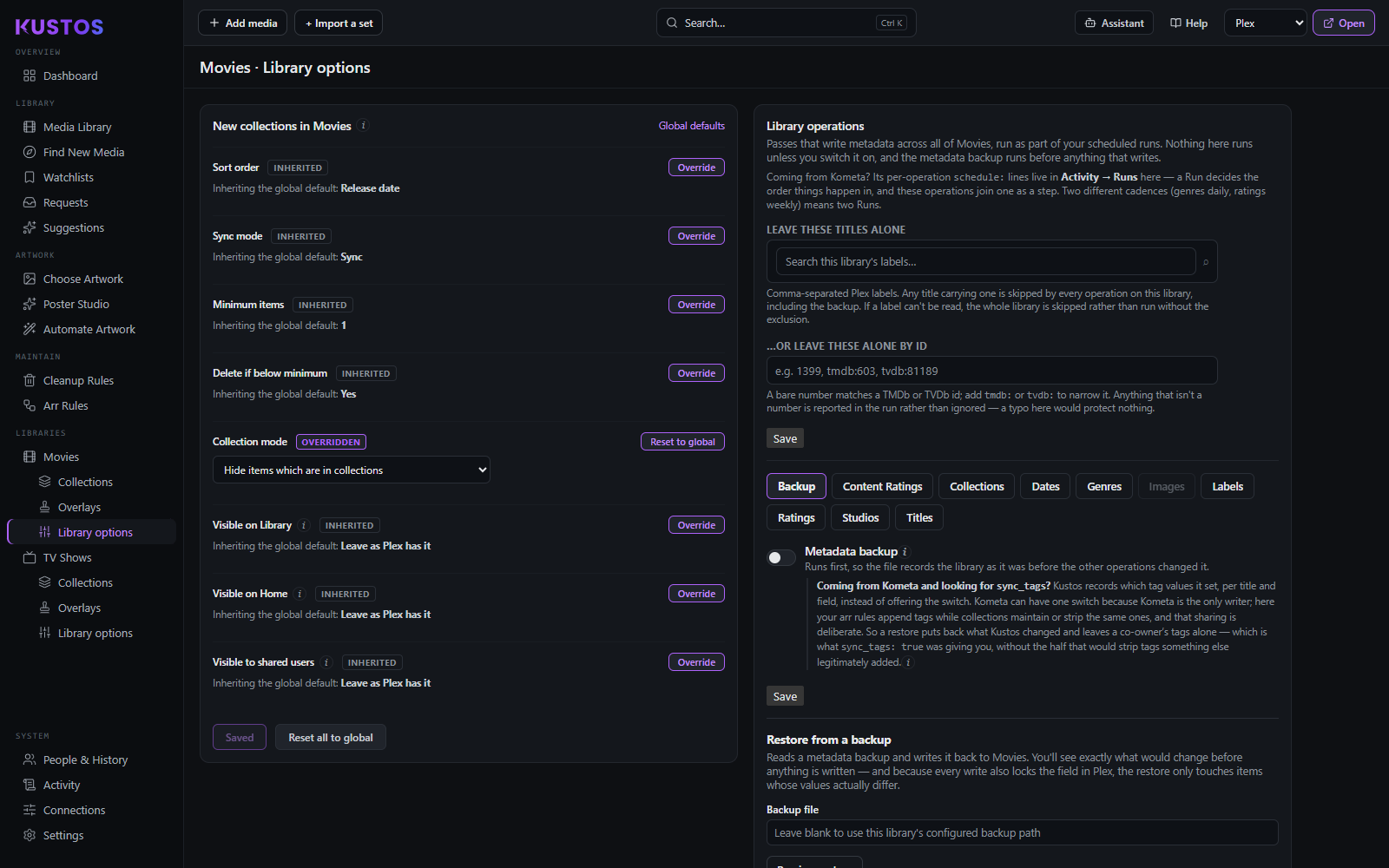
Starting values for anything new in this library. Everything on this screen is a collection default; the metadata writers live further down the same page in Library operations.
Precedence: global Collection defaults → this library → the collection itself, and it applies to new collections only. Changing something here does not reach back and alter a collection that already exists.
Inherited or Overridden — read this before the table
Every row carries a tag and a button, and this is the part people miss:
| State | What the row is doing | The button says |
|---|---|---|
| Inherited | The row shows "Inheriting the global default: X" and no control. This library has no opinion — change the global and this follows it. | Override |
| Overridden | The control appears and this library's value wins. The global can change underneath it and nothing here moves. | Reset to global |
Override seeds from the current global, so pressing it never changes what a build would do on its own — it freezes today's value and stops tracking. That matters when you are overriding one row of several: the rows you left alone keep following Settings, and the one you touched does not.
Reset all to global at the bottom removes every override on the library at once, and asks first.
The rows
| Setting | What it does | Values |
|---|---|---|
| Sort order | The order titles sit in inside the collection, in Plex. | Release date · Title (A–Z) · Random · Custom (builder order) · Critic rating · Audience rating · User rating · Date added |
| Sync mode | The one that can remove things. Append only ever adds, so a title you added by hand in Plex stays. Sync makes Plex match the builder exactly, so anything the builder did not put there is removed. | Append · Sync |
| Minimum items | A built collection with fewer members than this is not worth having. | A number, 1 or more |
| Delete if below minimum | What happens when it is below the minimum: leave it alone, or delete the collection. | On · Off |
| Collection mode | Plex's hub visibility for the collection — whether the collection and its member titles both show in the library grid. | Library default · Hide collections but show their items · Hide items which are in collections · Show collections and their items |
| Visible on Library | Whether the collection appears on the library screen. | Show · Hide · Leave as Plex has it |
| Visible on Home | Whether it appears on Plex's Home. | Show · Hide · Leave as Plex has it |
| Visible to shared users | Whether other people on the server see it. | Show · Hide · Leave as Plex has it |
The three Visible rows are Plex Pass only, and "Leave as Plex has it" is not a third way of hiding — it states nothing at all, so whatever Plex already has stays. Pick Hide if you mean hidden.
Sync mode is the row to read twice. It is the only setting here that can take titles out of a collection, and "Append" tells you nothing about what "Sync" would do to a collection you curate by hand. Kustos spells the consequence out beside the toggle for that reason.