



The tabs
| Tab | What it is for |
|---|---|
| Library | Choose the title you are designing against. |
| Templates | The built-in base designs. Pick the one closest to what you want and adjust. |
| My Templates | Your saved templates and their rules. This is the half that decides what gets drawn — see below. |
| Images | The art, logo and network-logo zones. Each can be dragged, resized, rotated, or given an upload. |
| Colors | Every colour on the poster — accent/frame, band, gradient, text, the art window line, the year box, the network plate, and the rules a design draws. Auto samples each title's own art and logo, so the result differs per poster rather than being one fixed palette. |
| Overlays | Frame preset, uploaded frame PNG, texture, intensity, side light, and where the texture is allowed to show. On Blank, also the My template boxes switch. Posters only. |
| Extra | The text and the switches: free text, the year line (and its size and font), the network box and its wordmark, rounded corners, the complete-season tag, the logo drop shadow, and the top and bottom gradient scrims. Posters only. |
| Save | Name it and store it. |
Three tabs disappear on a title card, and that is deliberate
Designing a title card hides Templates, Overlays and Extra.
A title card is rendered from one style object, and that object has no field for frame, texture, side light, badge, scrim, drop shadow, caption or collection label. Every control on those three tabs was being offered and then thrown away.
A control that accepts input and discards it is worse than an absent one. It looks like it worked, so the thing you tried is the last thing you would suspect when the card comes out unchanged. Nothing a title card can actually use went with them.
A control you cannot see is a control that could not have done anything
Poster Studio hides a setting on a template it cannot change. This is not tidiness — a picker that accepts a colour and changes no pixel reads as a broken feature, and the only way to find out is to try it and stare at an unchanged poster.
So: Accent / Frame appears once a frame preset or a texture is on, because those are the only things it colours on a design with no accent line of its own. Band is hidden on Full bleed and Top plate, whose art runs to all four edges, so there is no mount to colour. Frame / Border is hidden on the templates that already draw a border, and on the ones where a frame is not wanted. Art window line is hidden on Arched window, whose window is a curve that a rectangle cannot be stroked around.
Where something is hidden, a line in its place says so and says where the control does live.
Images — and the template boxes
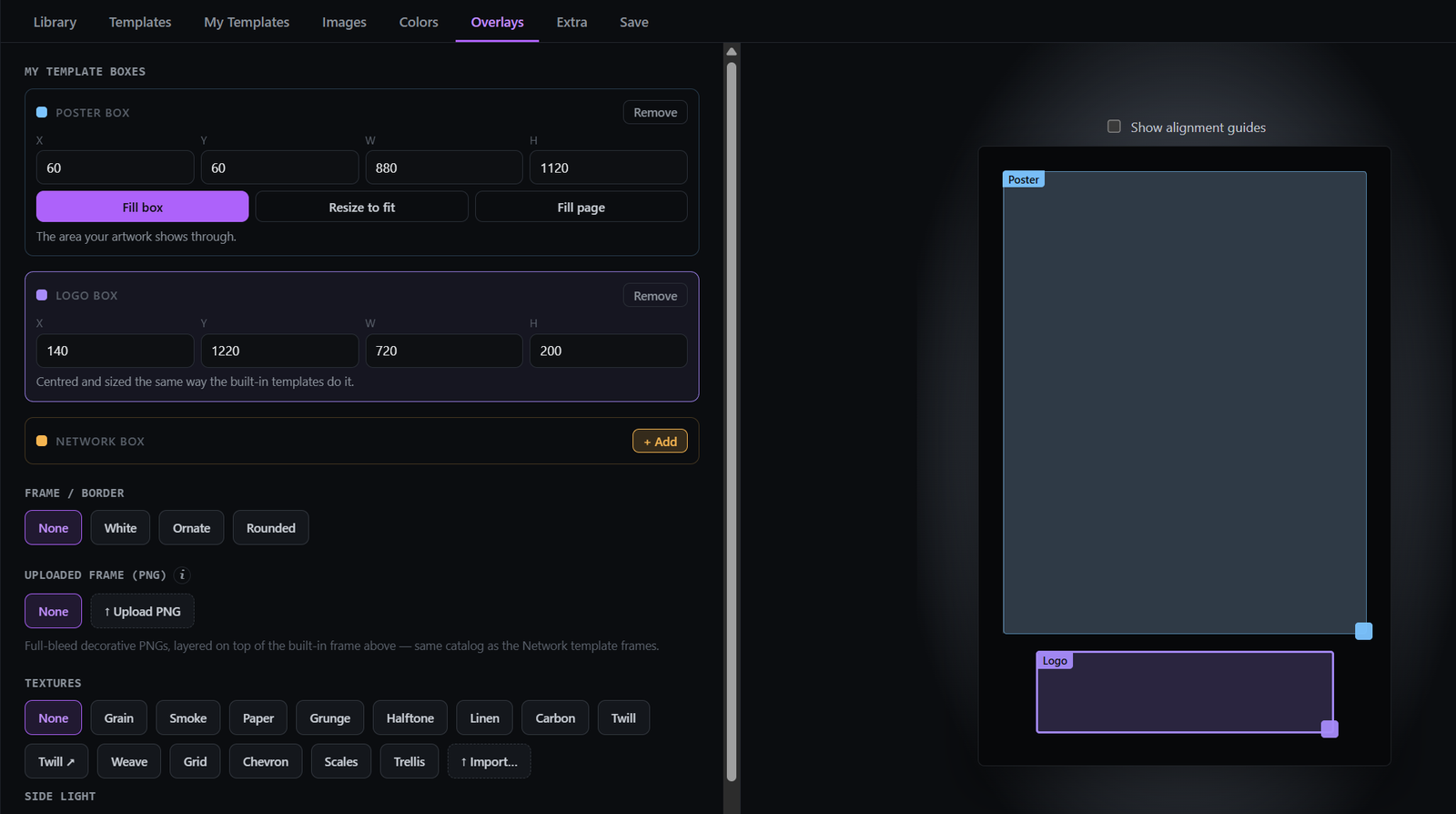
On the Overlays tab, turn on My template boxes and you place the zones yourself, as boxes. It is offered on the templates with no frame of their own: Blank, Gradient, Horizon, Top plate and Full bleed. The others already fill those spots. It is how auto-create puts a network or brand logo, and the title logo, exactly where you want them, with free text beneath:
| Box | What it is |
|---|---|
| Poster box | The area the artwork shows through. |
| Logo box | Where the title logo is drawn. Centred and sized the same way the built-in templates do it. |
| Network box | Where a network or streamer wordmark is drawn. Added when you want one. |
Each takes X, Y, W, H in pixels on the poster canvas, and the poster box has three shortcuts — Fill box, Resize to fit, Fill page. The boxes are drawn over the live preview as you edit, so you can see the frame they leave.
Uploaded frame (PNG) draws a full-bleed decorative PNG over the whole poster — the same catalog the Network template frames come from. It is offered on Blank and My template boxes only, alongside the boxes themselves: your own frame and your own layout are one job, and layering a decorative border over a template that already draws one is two borders fighting.
Fonts
Anywhere Poster Studio takes a font — the free text, the year, the network wordmark — it offers the same catalogue: a few built-ins plus every face in your font folders (Settings → Setup → General).
The designs themselves are set in IBM Plex Mono, and its three weights are built in: Medium, SemiBold and Bold. There is no separate weight control. There was one, and it did nothing the moment a font was picked, because a chosen face carries its own weight — two ways to do one thing, one of which quietly stopped working.
A font that will not load falls back to Plex Mono rather than dropping the text. Losing a year to a stale font id would be a silent failure; a wrong typeface is one you can see.
Overlays — the frame preset
| Preset | What it draws |
|---|---|
| None | No border. |
| White | A clean white inset frame. |
| Mount | A solid border in your accent colour, with the whole poster scaled down and sitting inside it — a mat, not a line painted over the artwork's edges. |
| Rounded | A coloured rounded frame. |
Mount is the one worth understanding. These templates run their art to the poster edge, so a border drawn on top covers the outermost pixels of the picture and reads as a bad crop rather than a frame. A frame needs the picture to be smaller than the paper, which is what Mount does.
It replaced a preset called Ornate — a fixed near-black band with gold lines, none of it changeable — which looked wrong everywhere for exactly that reason.
Frame / Border is not offered on every template. It is hidden on the seven that draw their own border (Gallery matte, Network frame, Interrupted rule, Bezel, Notched, Slant, Fade) and on seven more where a preset is not wanted (Arched window, Bottom band, Network footer, Stacked lockup, Header strip, Spine, Offset frame). Slant and Fade keep their border sections editor, which colours the border those two draw for themselves.
Overlays — texture, and where it is allowed to show
Textures are tinted to match the poster's own colours. The part worth knowing is Where it shows:
| Choice | Effect |
|---|---|
| Template only (default) | Texture stays off the artwork and the logos. |
| No border | Also skips the accent frame. |
| Whole poster | Everywhere. |
| Frame only | The inverse of No border — texture shows on the accent frame and nowhere else. Offered on Matte, Network frame and Interrupted rule, the three designs that stroke a real border. Not offered on Offset or Arched window: their "frame" is the plate showing through an inset or a window, so texturing it would mean the same thing as Template only. |
Hide from badges & banner keeps the texture off overlay badges and the collection banner, so a rating chip stays legible.