



AI keys — getting one, and what the free tier covers
What they are for. Three different jobs, and Kustos keeps three separate keys so they can never spend each other's quota.
| Card | Job | How hungry |
|---|---|---|
| Gemini Vision | Several jobs, each with its own switch in Automate Artwork, all on by default: checking candidate posters for baked-in titles (the heaviest), erasing a baked-in title when nothing textless exists (one generative edit per title that would otherwise be skipped; the most expensive single call), keeping drawn titles off faces in episode stills, noticing stills that already have words, and drawing a wordmark for a title with no logo. | The most of the three, but spread over nightly passes rather than spent at once. Each job uses free keys first, then a paid one. The wordmark is one call per title once it succeeds, then reused, as long as the Local assets folder is set. |
| Suggestions AI | Building each person's suggestion list and their Plex rows. | About one call per person per day. |
| AI Helper | The in-app assistant. | Only when you use it. |
Cost. Free. Google's free tier covers all three, artwork detection included — see the free limit below for why it goes further than the headline number suggests. Paying buys speed, not capability.
Use Gemini for the Vision card. It is not a preference and not a recommendation we are hedging — the artwork side talks to Google's endpoint directly and has no other provider, so a key from anywhere else will not work on that card. It is also the one that has been tested for the thing that actually matters here, which is whether the results are any good: textless detection that agrees with what you see, and drawn wordmarks worth keeping on a poster.
The other two cards do take other providers. Suggestions and the Assistant speak the OpenAI and Anthropic dialects as well as Google's, with their own base URL and model, so you can point them at whatever you already pay for. Only Vision is fixed.
Worth saying plainly: Google's is what has been exercised. The other dialects are implemented and work, but how good the answers are varies by model in ways nobody here has measured — so treat them as untested rather than as recommended or as broken. If a model you point Suggestions at starts returning titles that make no sense, try Google's before assuming Kustos is at fault.
One thing worth checking, on whichever provider a card is pointed at: whether that tier trains on what you send it. Artwork detection uploads the image being checked, and those images come from TMDB, Fanart.tv and the other sources — whose terms let you use the artwork, not hand it to someone else to train on. Inference is not training, so an ordinary API tier is fine; but some free consumer tiers do train on submitted content by default, and a few make it a setting rather than a promise. It is your key and your account, so it is your provider's current terms that apply — worth a glance at the tier you are actually on.
Steps for a free Google key. Any Google account works; there is no separate signup.
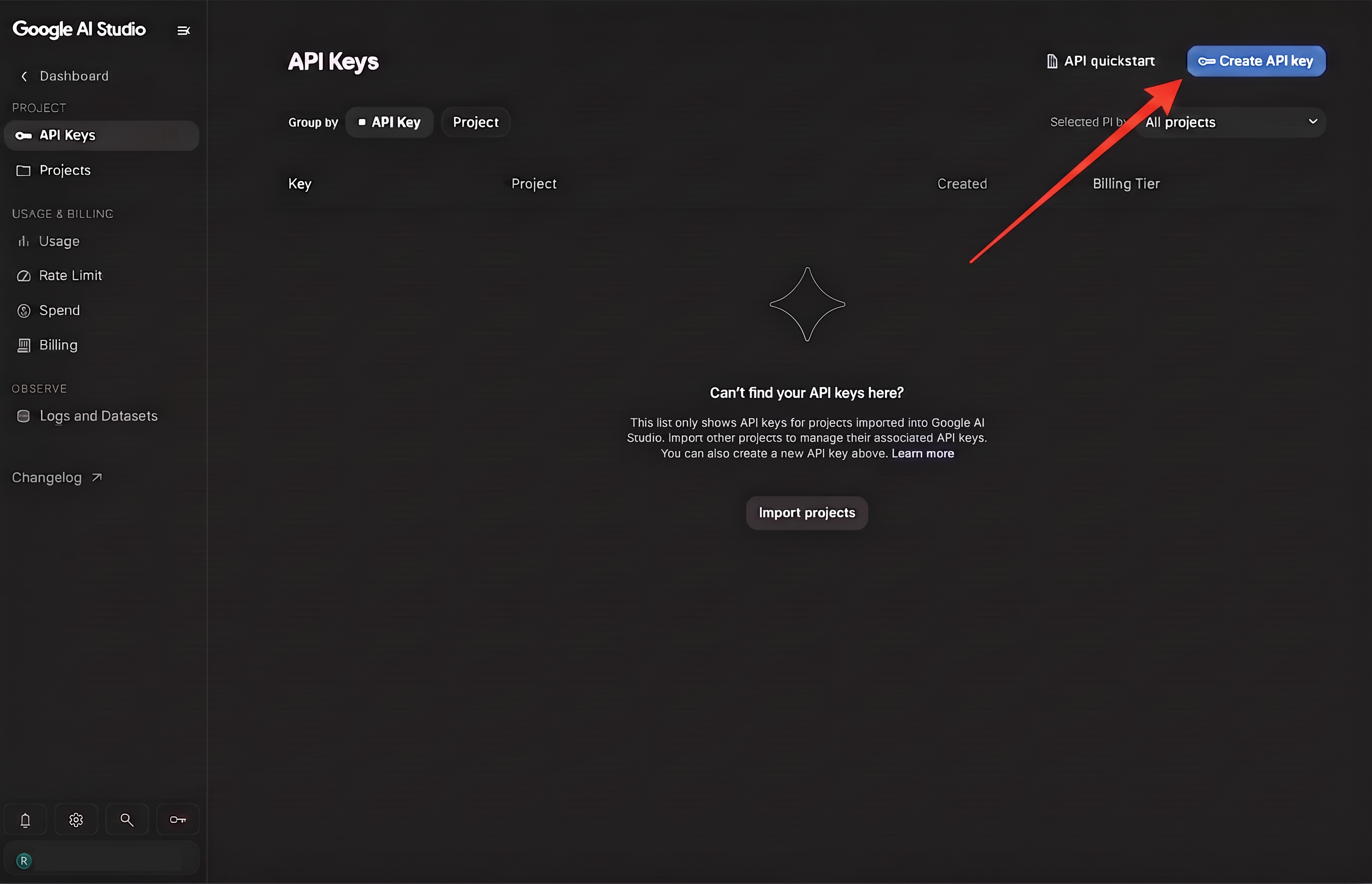
- Go to aistudio.google.com/apikey and press Create API key.
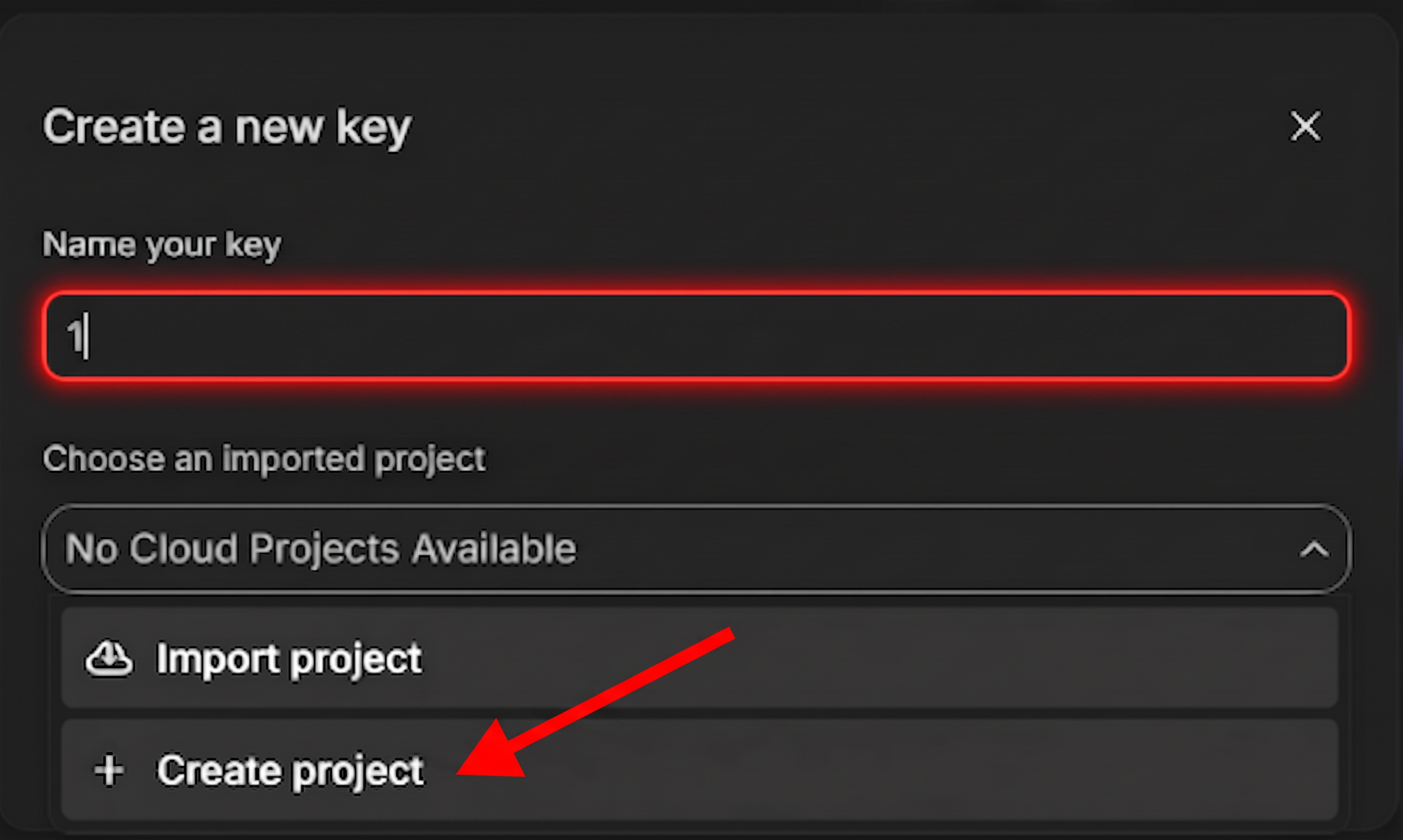
- Name the key, then open Choose an imported project and pick Create project. This is the step people get wrong — read the quota note below before you reuse an existing project.
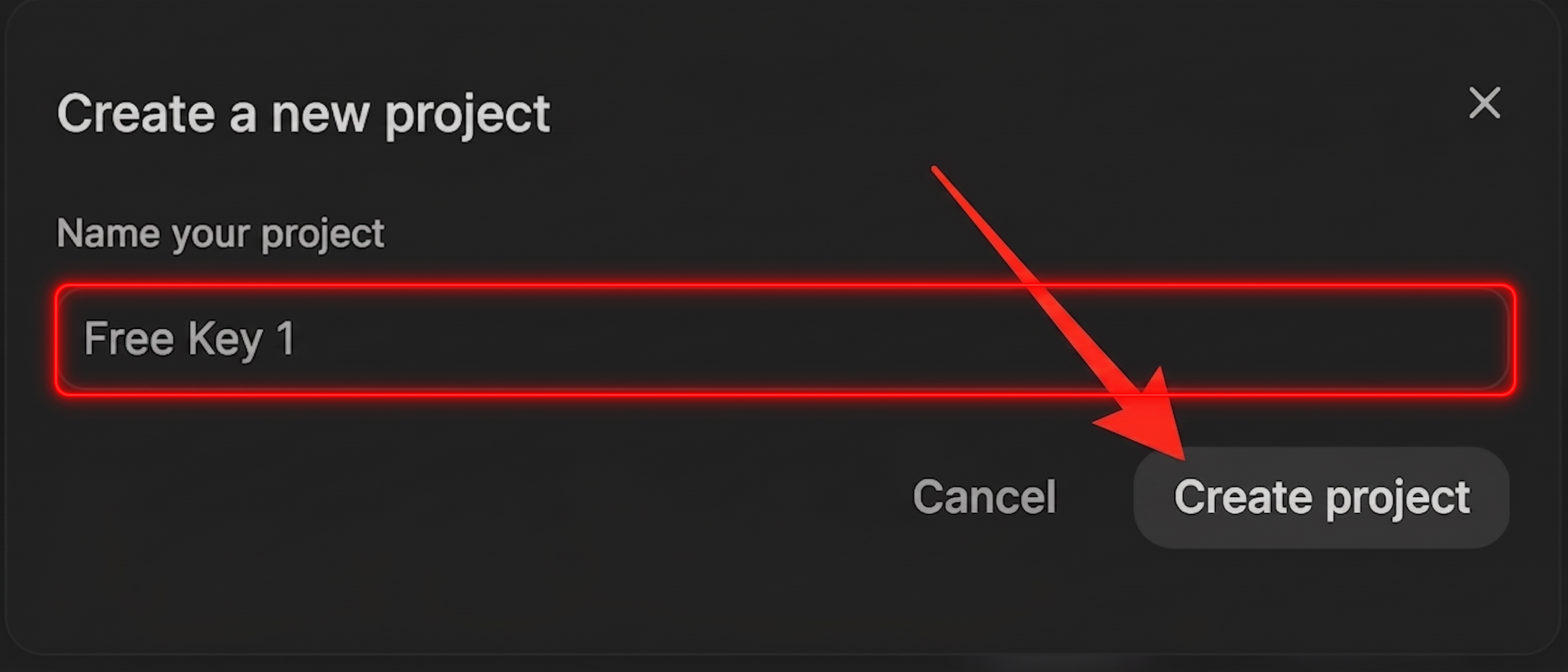
- Name the project something you will recognise later, and press Create project. Naming it after the job it serves makes the next key obvious.
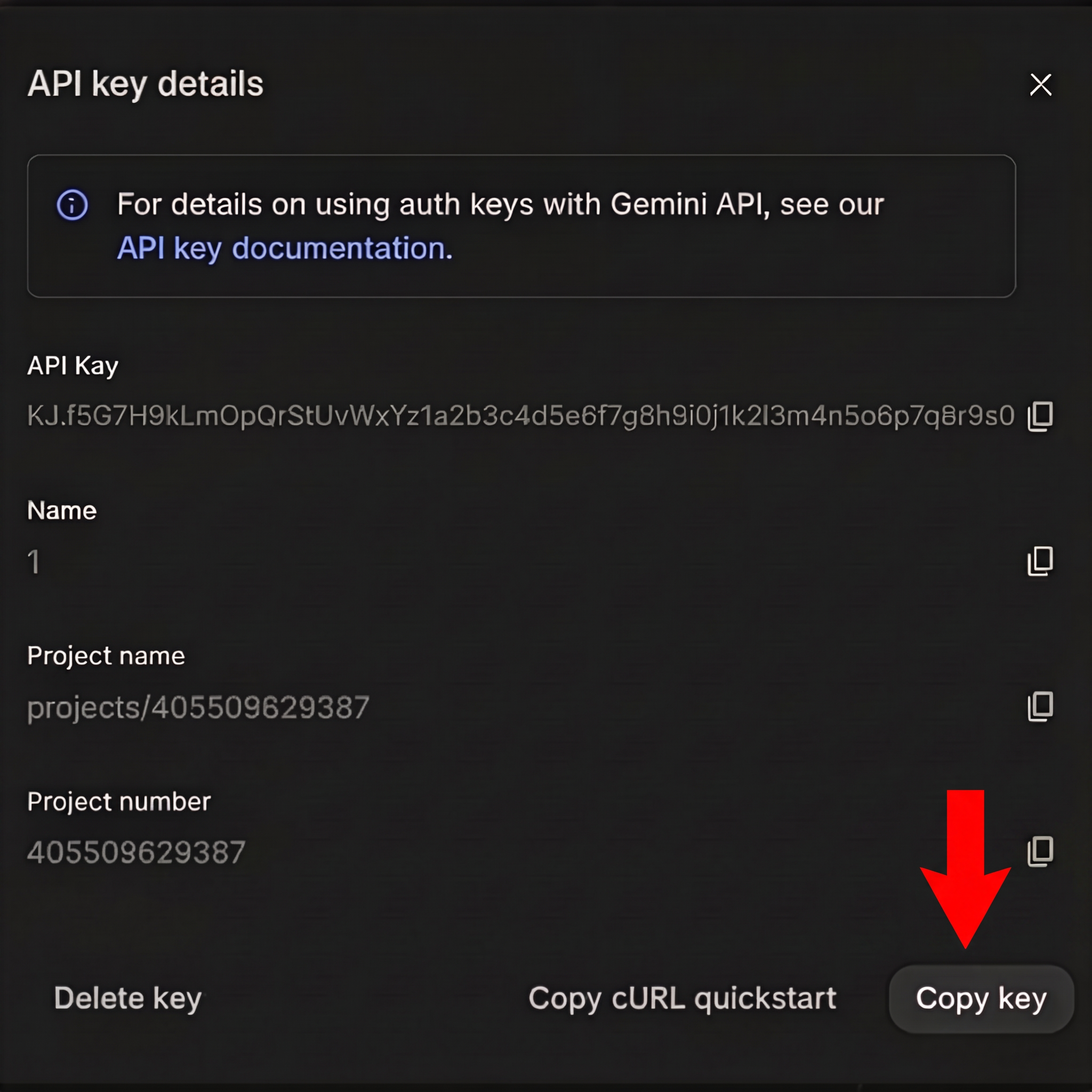
- Copy the key. The dialog also shows the project it belongs to, which is worth noting if you are going to add spares.
- In Kustos, Connections, open the card for the job you want it to do, and paste it there. Give each of the three its own key.
Quota is per project, not per key. Every key created inside one Google Cloud project draws on that project's budget, so making five keys in the same project buys you nothing — five keys, one budget. For real headroom, create a new project in step 4 and generate the key there.
The free limit, and why it goes further than it looks
Google meters roughly 20 requests a day per model, and that per-model detail is the whole story. Kustos tries every model on a key before it moves to the next key, so one free key is worth several times twenty a day rather than twenty flat. Switching model on a key that is out is a free retry; reaching for a spare first would spend paid quota while the free key still had an allowance.
Artwork detection is not a single sweep. It runs as part of the nightly pass, checking what it needs as Kustos walks the library, so a big library fills in over a stretch of nights instead of demanding thousands of calls in one go. That is what makes a free key enough for it — you are trading time, not capability.
A suggestion run is one call per person per day, so it barely touches the allowance at all.
Other providers work. Anthropic, OpenAI, and anything speaking the OpenAI chat API — OpenRouter, Groq, Together, LiteLLM, and local runtimes like Ollama and LM Studio — can drive Suggestions AI and the AI Helper.
- Get a key from that provider.
- In the Kustos card, set the address to the provider's endpoint.
- Paste the key.
- Set API shape if Kustos cannot tell the provider from the address. It is Auto by default, which reads the provider off the address and assumes Google for anything it does not recognise — so set it explicitly for anything self-hosted.
A local model has no quota at all, which is worth considering for Suggestions and the AI Helper. It cannot do artwork detection, which only talks to Google.
Artwork detection is still Google-only. It sends images, and that path has not been ported to the other API shapes.
One card per job, with both allowances inside it
There is one card for Vision, one for Suggestions and one for the Assistant — not one per key. Every key for that job lives inside its card, grouped by which allowance it bills against:
Gemini Vision 25 keys FREE TIER 20 PAID 5
You say which allowance a key is on when you enter it, as Free tier or Paid. That is the moment you certainly know, and it is what lets Kustos spend them in the right order without anybody encoding it in the key's name.
Each key shows the last four characters of its own value. A label is what you called it; those four characters are what Google's console calls it. When one of twenty keys goes bad, that is how you know which one to go and fix.
Which allowance each job spends
Not every job treats them the same, and this is deliberate:
| Job | Spends |
|---|---|
| Title cards | Paid only. It goes straight to a paid key — there is no free step to exhaust first |
| Suggestions | Free, then paid. Every free key in turn, and when the day's quota is gone, the paid one |
| Artwork vision | Free, then paid. Every free key in turn, then a paid one if you have added one |
Artwork vision is the highest-volume job, because it runs on every auto-create pass. It uses the free keys first and then a paid one, so on a large library a paid key will be charged. If you do not want that, turn off Check whether candidate art already has a title on it in Automate Artwork, or keep paid keys off the Vision card.
Spare keys. More quota for the same job. When a key runs out, Kustos moves onto the next one and back again the next day, trying every model on each before giving up.
Add them from the key's own card on Connections — press + Add a spare key and the add form arrives already named correctly. That naming is the whole reason the button exists: a spare is identified purely by its name, so typing Gemini key 2 or Gemini Key2 by hand gives you an ordinary second card instead of backup quota, with nothing on screen to say why.
Spares appear grouped on the key they back up, not as loose cards further down, so one look answers how much spare quota is behind this slot, and is any of it broken?
A broken spare says so on the parent card, with a count — and opening the group names which one. A spare that has gone bad is otherwise silent by design: it is only reached when the main key is exhausted, so it can sit broken for weeks and you would find out on the day you needed it.
Two rules that have not changed:
- A spare does not have to be enabled. Kustos uses a disabled card as a fallback on purpose. Switching it on would put it back in the pool serving people who have no key of their own.
- The fallback is named, never guessed. Kustos will not spill a free-tier person onto your paid key just because their key was busy. If you want that, say so by naming it.