



Media management
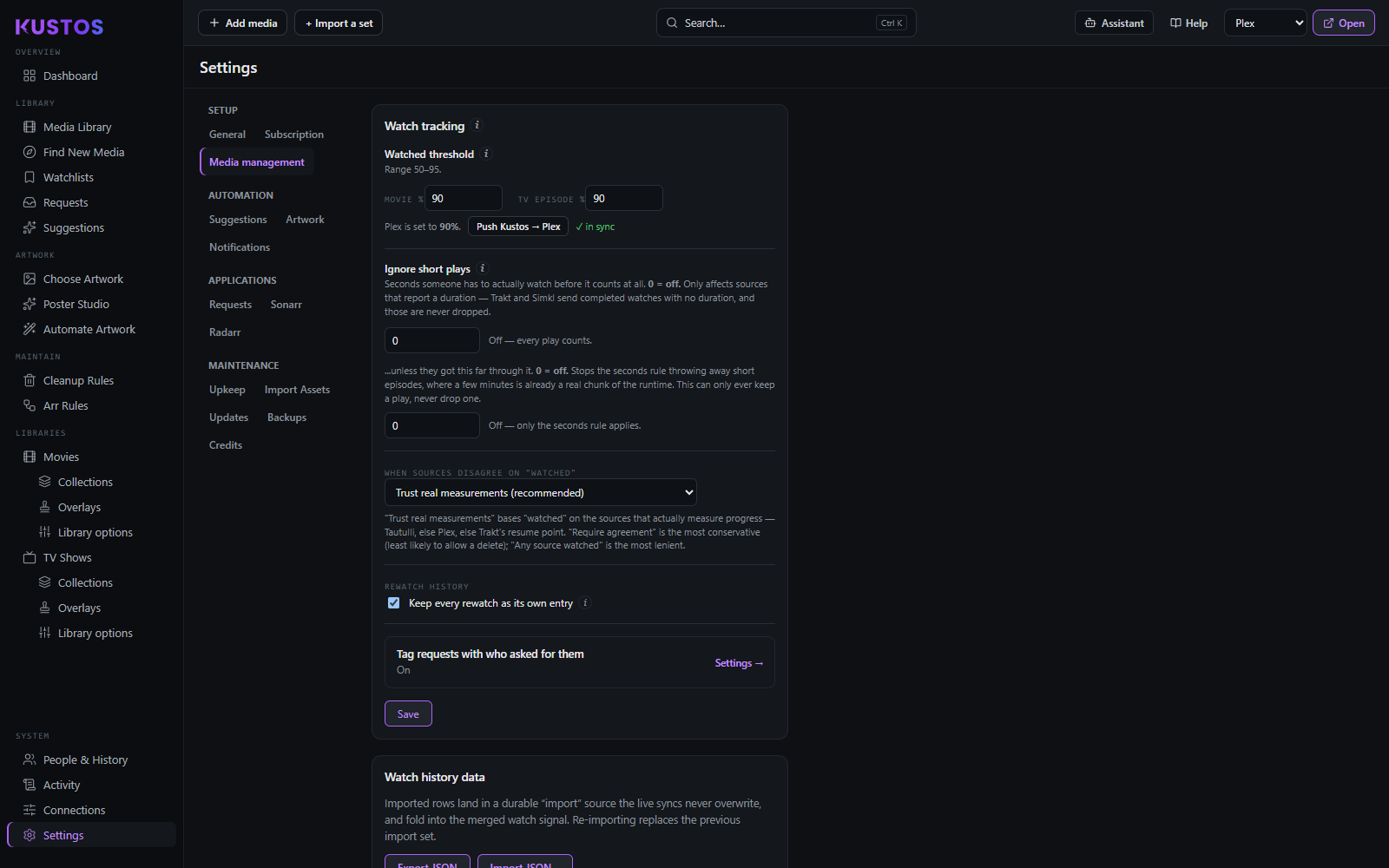
Watch tracking
This block decides what the word "watched" means everywhere else in Kustos — cleanup rules, collection membership, the watch percentage on a title, the protection that stops something being deleted. It is worth reading properly before changing.
Set this before you write a cleanup rule
Every deletion rule is keyed on "watched", so these settings decide what those rules do. Getting them right afterwards means re-reading every rule you wrote in the meantime.
- Connect Tautulli first if you are going to. It sees sessions Plex has already forgotten, and it is the source the recommended mode prefers. Doing this after setting thresholds means setting them twice.
- Read the values your other tools already use rather than inventing new ones. Match Tautulli copies that install's own Movie and TV watched percentages in; Match Plex copies your server's. Both appear only when they have something different to offer.
- Decide whether Plex should follow Kustos. Push Kustos → Plex writes your Movie % into Plex. Use it if you want one number everywhere; skip it if Plex's own threshold is deliberate. This is the only button here that changes another application.
- Set Ignore short plays. Without it, a browsing session leaves half your library reading as In Progress, and "in progress" is exactly what protection rules key on. A couple of minutes is usually enough.
- Pick the disagreement mode. Trust real measurements unless you have a reason. Require all sources to agree sounds safer and is the one that quietly blocks every rule when a service you rarely sync holds everything at unwatched.
- Look at a few titles you know you have finished before writing a rule. Their watch state on the title screen is what the rule will see.
Watched threshold is two fields, not one: Movie % and TV episode %, each accepting 50–95. They are the percentage of a title that counts as finished.
Set them below 100 so that finishing during long end credits still counts. Since the fields stop at 95, Kustos will not let you make the mistake that a threshold of 100 causes: a title only ever counting as "watched" if the player reported the very last frame, which many clients never do.
Three buttons sit beside them, and they are worth telling apart:
| Button | Direction | What it does |
|---|---|---|
| Match Tautulli | Reads | Copies Tautulli's own Movie/TV Watched Percent into these two fields. Only appears when Tautulli is connected and its values differ from yours. |
| Match Plex | Reads | Copies your Plex server's threshold into both Movie % and TV episode %. |
| Push Kustos → Plex | Writes | Sends Movie % to your Plex server, changing a setting in Plex itself. It is the only control on this card that changes another application, so it is the one to be deliberate about. Plex only takes 70–95 in steps of 5, so the value is snapped to the nearest step it accepts. |
Ignore short plays. Seconds somebody has to actually watch before it counts at all. Start something, watch a minute, back out — without this that counts as a play, and the show reads as In Progress forever afterwards.
0 turns it off and every play counts. It also only affects sources that report a duration: Trakt and Simkl send completed watches with no duration attached, and those are never dropped however high you set this.
When sources disagree on "watched". Plex, Tautulli, Trakt and Simkl each report watches, and they disagree constantly — Trakt counts a title watched at 80%, Plex uses its own threshold, and Tautulli sees sessions Plex has already forgotten. One select decides what Kustos believes:
| Option | Behaviour | When it is right |
|---|---|---|
| Trust real measurements (recommended) | Bases "watched" on the sources that actually measure progress — Tautulli, else Plex, else Trakt's resume point — rather than on one that reports only a yes/no. | Almost everyone. |
| Require all sources to agree | Every enabled source must agree before a title counts as watched. The most conservative, and the least likely to allow a delete. | Only if a source is actively lying to you and you would rather under-count than over-count. Be aware that a service you rarely sync will hold every title at "unwatched" and block anything keyed on watched. |
| Any source watched counts (lenient) | One source saying watched is enough. | You watch across several devices and services and a title you finished on one is finished. |
The merged store is a union: features read the combined answer, not one source's. A source that has never been synced contributes nothing rather than contributing "no".
Rewatch history. On, Kustos keeps every play. Off, it collapses to one row per title.
This changes only how much history the database keeps — not what counts as watched. Turn it off if the database is growing faster than you want and you never look at per-play history; leave it on if you want to see when you watched something, or if anything in your setup reasons about play counts.
Requests — turning watchlist adds into requests
Whether a person's watchlist additions become Sonarr/Radarr requests, and which tag identifies the requester. See also Applications → Seerr, which covers the same job arriving from a different direction — the two intakes are deliberately separate.
Collection defaults
The values a newly created collection starts with. Changing them does not touch collections that already exist.
| Setting | What it does |
|---|---|
| Sync mode | Whether a build syncs (Plex ends up matching Kustos exactly, members removed as well as added) or is add-only (Kustos only adds; anything you put in by hand survives). Kustos ships with Sync. Switch to add-only if you also curate collections in Plex by hand, or Sync will remove what you added. |
| Collection mode | What Plex shows for the collection: Leave as Plex has it · Hide · Show collections and their items · Hide items which are in collections · Hide collections but show their items. This is Plex's own setting, written by Kustos. |
| Sort order | The order members appear in. Release date, added date, title, last watched and play count are all available; the last three are computed by Kustos and applied client-side. |
| Minimum items | A collection below this many members is not built. Stops one-film "franchises" appearing the moment a sequel is announced. Franchises use max(2, minimum) — a franchise of one is not a franchise whatever the number says. |
| Visible on | Plex Pass only — see Getting your keys → Which features need something extra. Which Plex surfaces the collection appears on: the library's Recommended row, your own Home, and your friends' Home. On a server without Plex Pass these have no effect at all — Kustos still stores the choice, Plex ignores it. Leave as Plex has it states nothing, which is not the same as hiding. |
Delete if below minimum is the companion to Minimum items. It is on this card as the default for new collections, on Library → Library options for one library, and on each collection. On, a collection that falls under its minimum is torn down instead of being left as a stub; off, it is kept and simply not rebuilt. Kustos ships with it on.
The nightly Delete empty collections task only removes collections that have it on, so it is decided collection by collection rather than by one switch.
Kustos draws one distinction here that is worth knowing about: a collection that resolved zero items because a source failed is not an empty collection, and is never deleted. That is evidence about the evidence, not about the collection.
Housekeeping
One checkbox, and it is the most destructive thing on this card.
Delete Plex collections Kustos doesn't manage. Arms a sweep that deletes any collection in Plex that Kustos did not make — anything left behind by another manager.
Matching is by name, which is what makes the sweep reasonable at all: a collection Kustos would adopt on its next build is never swept, and that is also what stops a near-duplicate accumulating beside one Kustos made.
The card shows how many unmanaged collections exist right now and how many titles they hold, so you can see what the sweep would take before arming it. Named exclusions are listed underneath when you have any — those are collections another tool owns.
Deleting a Plex collection removes a grouping, not media. But a collection you made by hand in Plex is one Kustos does not manage, so it is swept too, and Kustos cannot rebuild it: its members, order and artwork are gone. The armed sweep runs as part of the nightly Delete empty collections task.
Genre mapping
Rename or delete genres a metadata agent invented, across the whole library.
- Fill genres from a source pulls genres in from TMDB, TVDB or Sonarr and unions them, rather than replacing what is there.
- Lock / Unlock controls whether Plex's own agent may overwrite the result on its next refresh. Locking is what makes a mapping stick.
- Remove deletes a genre everywhere it appears.
- Reset puts the mapping back to nothing; it does not restore genres already removed from Plex.
Identity reconciliation
TMDB sometimes splits a series that TheTVDB keeps as one. Kustos collapses those onto a single canonical id so that watch marking, Trakt sync and posters all agree about what the show is.
- Suggestions only lists what it would collapse without acting.
- A Media Library id override always wins — if you have told Kustos what a title is, reconciliation does not argue.
- States are SUGGESTED (found, not applied), LINKED (applied) and CANONICAL (this is the id everything else resolves to).
Worth reviewing rather than accepting wholesale: a wrong link makes one show's watches count for another, and watch state feeds deletion rules.
Two warnings it raises, and what each actually means:
- Different titles merged onto one identity. Two or more shows you own, with different names, were collapsed together without a hand override. Usually right; occasionally two genuinely different shows. If they are different, add an override or alias to separate them.
- An anthology unified upstream. When TheTVDB treats an anthology as one series — The Haunting: series 1 Hill House, series 2 Bly Manor — Sonarr stores it under a single TMDB id, so the other seasons' own TMDB series never link up on their own. That is upstream behaviour rather than a Kustos fault, and the fix is the same: say which id you mean.