



Title Detail
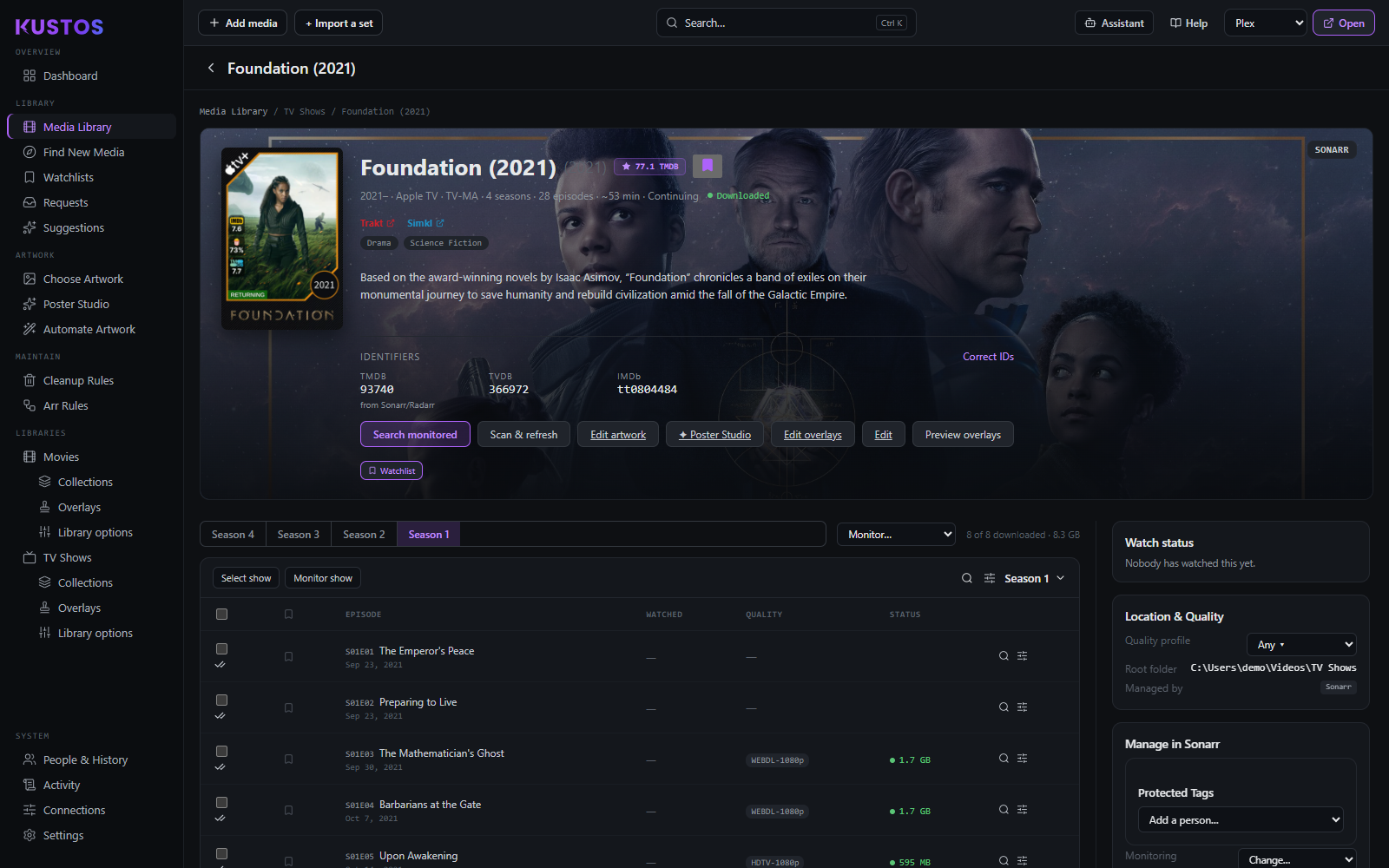
Everything about one title, and where most day-to-day edits happen. Reached by clicking any title anywhere in Kustos.
Work out why a title is about to be deleted
The question this screen answers better than any other. A cleanup rule is about to remove something and you want to know why, or why not.
- Open the title.
- Read Cleanup protection. It states the title's status right now and the reason for it, rather than making you re-read your rules and guess.
- If it is protected and you did not expect it, the reason names what is protecting it — a collection, an *arr tag, somebody's watch progress, or a per-person keep tag.
- If it is not protected and you want it to be, the usual fixes are adding it to a protected collection or setting somebody's keep tag on it.
See Cleanup Rules for what each protection means.
Fix a title that matched the wrong thing
When a show has pulled the wrong artwork, the wrong episodes, or the wrong year, the identity is wrong rather than the data.
- Open the title and find Identifiers.
- Check the TMDB, TVDB and IMDb ids against the real title.
- Override the wrong one by hand.
- Everything keyed on that id — artwork, collections, ratings, dedupe — follows, because Kustos keys on the id and not on the title string.
Mark something watched, or unwatched, for somebody
- Open the title. For a show, select the episodes in the episode table first.
- Pick the person.
- Set the date to Watched: now, or Watched: air date (shows) / Watched: release date (movies) when you are correcting history rather than recording a play, then press Mark watched. The second date is the one to use when backfilling, because it keeps the dates honest and anything that reasons about "how long ago" stays right.
- Mark unwatched beside it undoes it.
Backdating reaches some services and not others. Trakt and Simkl accept the date you give, so a backfilled history comes out in the order things aired. Plex always stamps it now whatever you choose — it has no way to record a play as having happened earlier. So a backdated mark is honest on Trakt and Simkl and today's date in Plex, and anything reading Plex alone will say you watched it today.
These are real writes to Plex, as that person. Marking and resetting both go to Plex on their account, so every tool that reads Plex sees the change, not just Kustos. It is not a Kustos-only note.
Whose account it acts as, and when it refuses. If that person has linked their own Plex account, Kustos uses their token. If they have not, the server token only works for you, because it is your account — using it for somebody else would reset your watch state under their name, so Kustos refuses rather than doing the wrong thing quietly.
What it changes downstream. Watch state is the input to most of the rest of Kustos, so unmarking something is not a cosmetic act:
| What | Effect of marking or unmarking |
|---|---|
| Cleanup rules | Directly. Anything keyed on watched, in progress, or watched-by starts or stops matching. Unmarking is the usual way to rescue something queued for deletion. |
| Multi-user protection | Marking somebody mid-way through protects the title for them; resetting removes that hold. |
| Collections built from watch data | Membership moves, so a collection you rely on for protection can gain or lose the title. |
| Suggestions and rows | Both read what has actually been watched, so the picks shift. |
| Percent watched | Recomputed from episodes against the real aired total, not against what is still on disk. |
What it does not do. It does not clear a keep or rewatch flag, does not remove a protected *arr tag, and does not take a title out of a protected collection. Those are separate decisions, and cleanup re-checks all four independently before it deletes anything — so a title can be unwatched and still protected, or watched and still held.
Every panel on this screen
| Panel | What it holds |
|---|---|
| Watch status | Per user, per episode. Mark watched now, or at the air/release date. |
| Episodes / seasons | The table, with quality and watched state per row. |
| Location & quality | Quality profile, minimum availability, root folder, and which *arr instance manages it. |
| Monitoring | Series monitoring mode, monitor new seasons, season folders, series type. |
| Tags & Labels | What is set on this title, in the *arr and in Plex. |
| In Collections | Every Kustos and Plex collection holding it. |
| Watchlists | Whose watchlists it is on. |
| Cleanup protection | Whether it is protected right now, and why. |
| Identifiers | TMDB, TVDB and IMDb ids, with a manual override. |
Four actions on this screen worth knowing before you press them:
| Action | What it does |
|---|---|
| Search | Asks the indexers. It is the only way to find out whether a better release actually exists — everything else on the screen reports what you already have. |
| Apply a monitoring preset | Applies it to the whole series and re-computes which episodes are monitored, so it can unmonitor as well as monitor. |
| Delete from Sonarr/Radarr | Removes the title from the arr. The confirm offers also delete files*, ticked by default, and prevent re-adding, off by default. Untick also delete files if you only want the arr entry gone. Prevent re-adding* puts the title on the arr's own import-exclusion list, so a list or an auto-import cannot bring it back. That list lives in the arr, not in Kustos. |
| Preview overlays | Renders the default overlays onto this poster so you can see them. Nothing is saved to Plex. |