



Connections
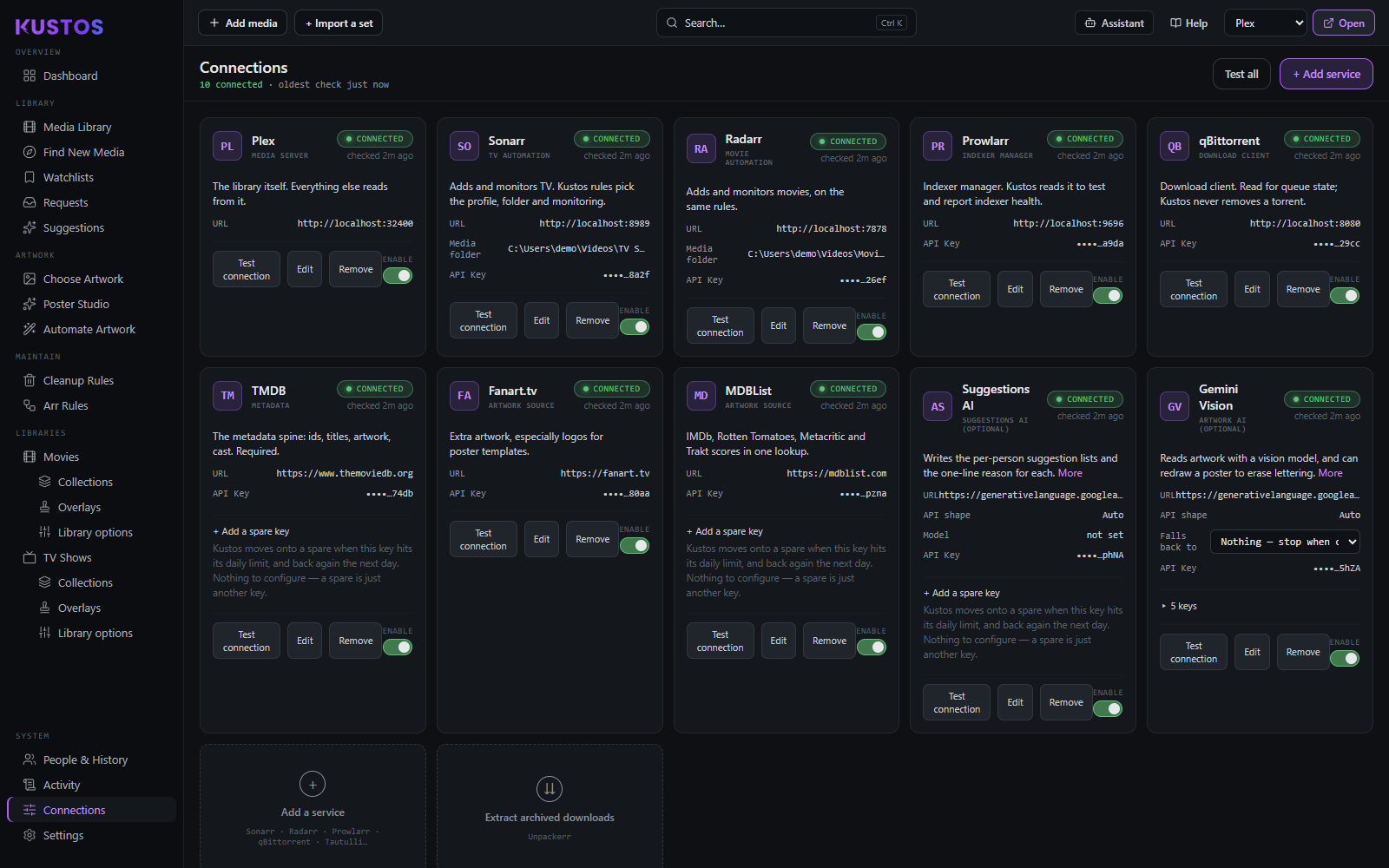
Every external service, one card each.
Put in an API key
The same six steps for every service on this screen, whichever one you are connecting.
- Find the service's card. If it is running on this machine Kustos has usually already detected it and filled the address in.
- Press Edit on the card.
- Check the address is the one you use in your own browser. This is the part that goes wrong more often than the key does.
- Paste the key into API key. Each card shows a Where to get one line naming the exact page on the other service, so you do not have to go hunting.
- Press Save.
- Watch the card. Kustos checks the credential as soon as you save, so a green status is the proof it worked. You do not have to restart anything.
Plex is the exception. It has no key field at all — you sign in instead, as the server owner. If you are staring at a key box hunting for a Plex token, you are on the wrong card.
qBittorrent is the other exception. It has no API key either; it takes the username and password from its own web interface.
What a card shows, and what each control does
| On the card | What it means |
|---|---|
| Status pill | The verdict from the last check. Kustos re-checks every connected service every five minutes, and one that stays down ten minutes gets a message on the Dashboard. Spare keys are not re-checked, so a spare's pill is only as fresh as its last test |
| Checked N ago | When that verdict was taken. A green pill from three weeks ago is not evidence the key works today, which is why the age sits beside it |
| URL | The address Kustos uses. Wrong more often than the key is |
| API key | Shown as the last four characters only — enough to tell which key it is, never enough to use |
| More | On the AI cards: the full explanation, including what that key is allowed to do. Worth reading once before you add a key |
| Test connection | Asks the service now, rather than waiting |
| Edit | Change the address, the key, the label |
| Remove | Deletes the connection. The service itself is untouched |
| Enable | Off means Kustos ignores it entirely — it is not a pause on one feature |
The AI cards work differently, and on purpose
There is one card per job — Vision, Suggestions, Assistant — not one per key, and every key for that job lives inside it:
Vision 25 keys FREE TIER 20 PAID 5
| Which group a key lands in | Whatever you chose — Free tier or Paid — when you entered it |
| + Add a spare key | Only on keys somebody else meters: the three AI slots, TMDB and MDBList. A Sonarr key has no daily quota, so a second one buys nothing |
| Each key's last four characters | So when one fails you can match it against your own records. The label is what you called it; those four characters are what the provider knows it by |
| N needs attention | A count on the group, and the failing key sorts to the top inside it. A spare is only reached when the main key is exhausted, so a broken one can sit unnoticed for weeks |
A spare does not have to be enabled. Kustos uses a disabled card as a fallback deliberately — switching it on would also make it eligible to become the primary, and which one gets picked then is luck.
See Getting your keys for which job spends which allowance.

Stuck on the other site rather than on this screen? Getting your keys is the long version: every credential, step by step, with pictures of the page you are looking for, what each one costs, and what you lose by skipping it. You should not need it for most services — the hint on the card is usually enough.
Supported: Plex (media server) · Sonarr (TV automation) · Radarr (movie automation) · Prowlarr (indexer manager) · qBittorrent (download client) · Tautulli · Overseerr/Jellyseerr · TMDB · Fanart.tv · MDBList · TheTVDB · and three separate AI keys (see below). Multiple Sonarr/Radarr instances are supported.
- Detected services — Kustos finds what's running locally and offers it, so you rarely type an address.
- Instance tiers — a second instance can be marked 4K. Kustos guesses this from the port it found the instance on, and that guess is often wrong: a second instance is just as often for kids, anime or another disk. It does not change what Kustos sends to the instance, with one exception: a standard + 4K pair on this machine is updated automatically each week (see Arr updates). If the guess is wrong, turn the tier off; that removes the marker from every screen at once.
- Trakt accounts and per-user sync toggles.
- Arr updates — Kustos reports update availability for your *arrs. If you have a standard and a 4K Sonarr (or Radarr) on this machine, Kustos updates both itself once a week, early Sunday morning, stopping each while it updates. Other instances are only reported.
- Merge control for duplicate detections, and a setup guide for anything not yet connected.
AI keys
Kustos keeps three separate AI keys — Gemini Vision, Suggestions AI and the AI Helper — one card each, because they do different jobs and spend at very different rates. Keeping them separate is the point: a suggestion run can never spend the quota artwork detection needs, and vice versa.
What each one is for, what it costs, and how to get one: AI keys. Google gives them away, other providers work, and a local Ollama or LM Studio has no quota at all.
Per person, you can pin which key builds their list — so a household can run most people on free keys and keep a paid one for whoever needs it.
Getting a key, adding spares, or working out what the free tier covers? Getting your keys → AI keys has the signup with pictures, the quota maths, the other providers, and how the fallback chain behaves.